Skip to content
Van Oosten Advies B.V.

App for Business Central

Your documents, designed and printed in Business Central

Layout 365 gives Business Central's own reports a designed layout, lets you change it in a designer inside Business Central or by asking the AI button, and prints it inside Business Central itself.

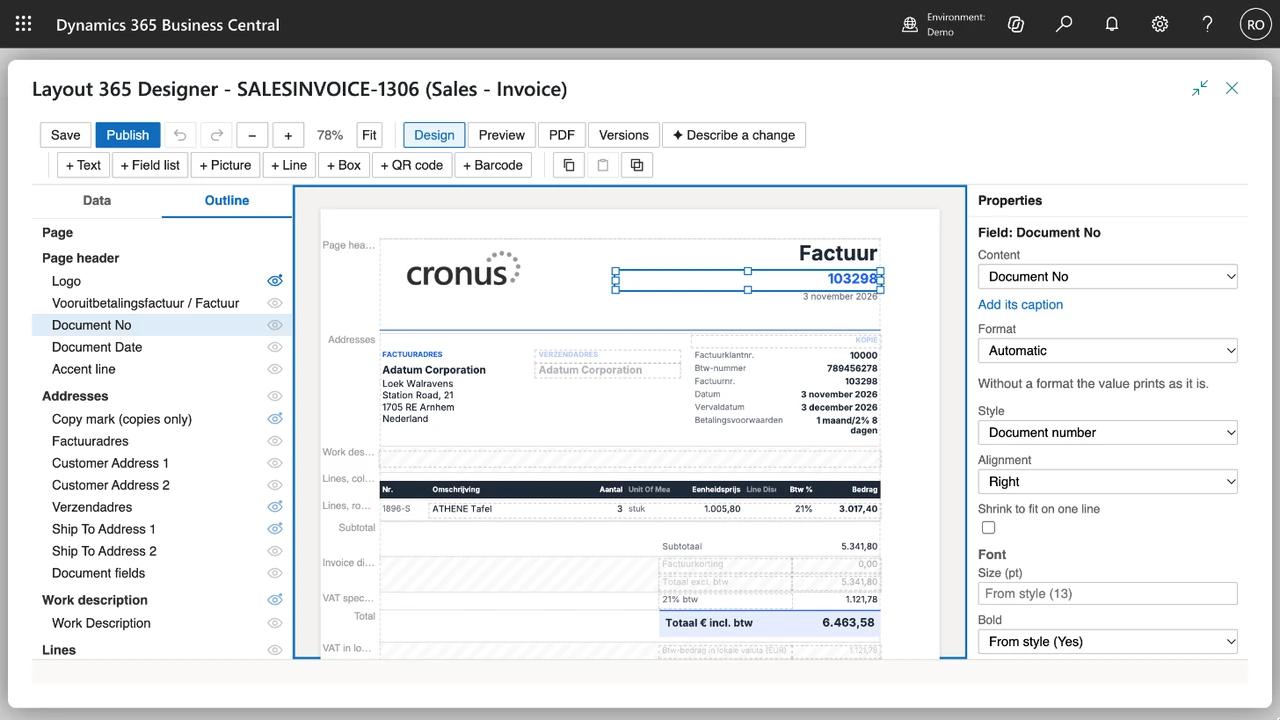
The Layout 365 Designer in Business Central with the layout SALESINVOICE-1306 of Sales - Invoice: the Outline of the page on the left, the invoice for Adatum Corporation in the middle with its document number 103298 selected, and the Properties of that field on the right
Change a layout in the designer inside Business Central, with one of your own documents as sample

Your quotes, invoices, shipments, reminders and labels are what your customers and vendors see of Business Central. With Layout 365 you design them inside Business Central, with the data of a real document of your company, and Business Central prints them with the Layout 365 engine. Previews, prints and e-mails are made in your own environment: no document leaves Business Central to be printed.

What is in the app

Layout 365 works on Business Central's own reports. It never changes your Report Selections or the document layouts of your customers and vendors: those stay your choices. The screens below come from a Business Central sandbox with the CRONUS demo data and the English client.

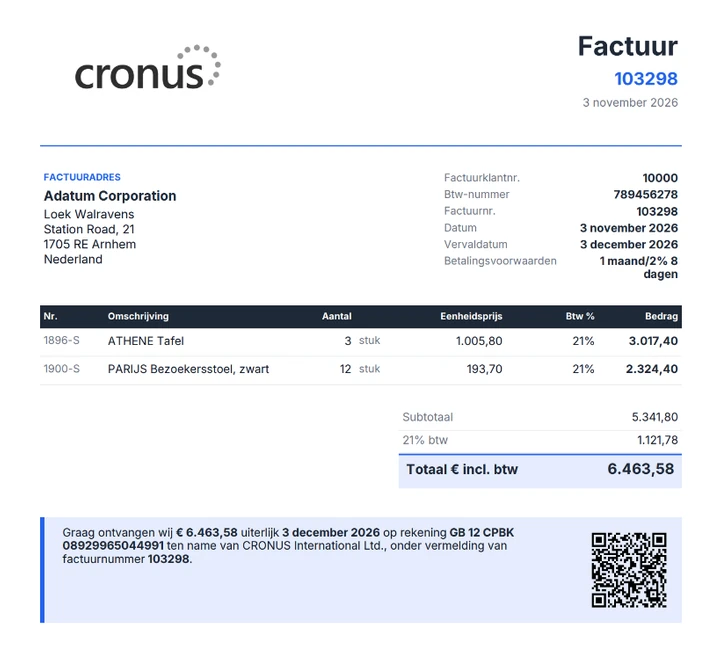
Invoice 103298 from CRONUS to Adatum Corporation, in Dutch, with the CRONUS logo, the billing address, the invoice details, two lines (ATHENE Tafel and PARIJS Bezoekersstoel, zwart), a total of € 6.463,58 including VAT and, at the foot, a payment request with a QR code
A sales invoice printed in Business Central with its Layout 365 layout and a payment QR code
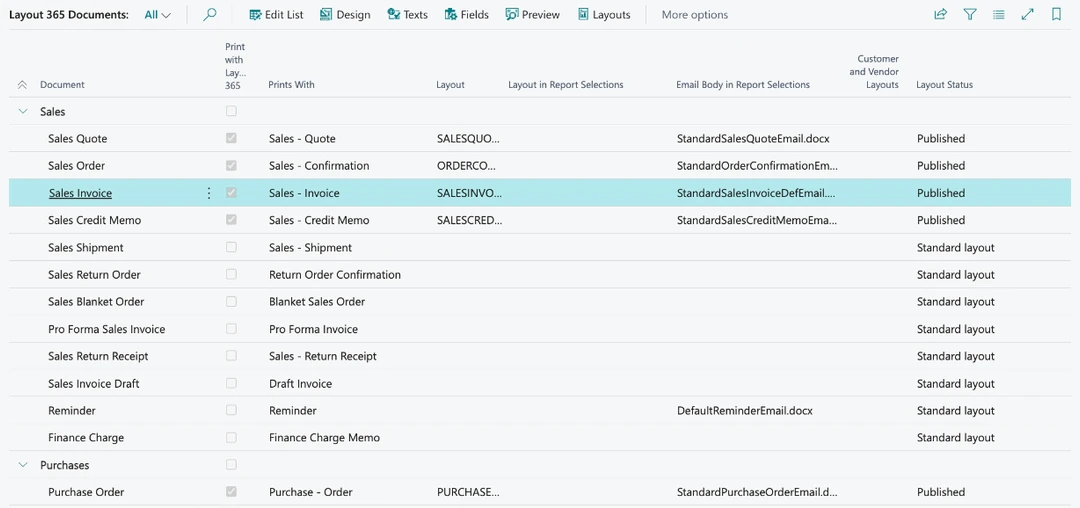
The Layout 365 Documents list, grouped into Sales and Purchases, with the actions Design, Texts, Fields and Preview: Sales Quote, Sales Order, Sales Invoice, Sales Credit Memo and Purchase Order print with Layout 365 and their layout is Published, the other documents show Standard layout
Every document in one list: switch it on to print with Layout 365, then design and preview it
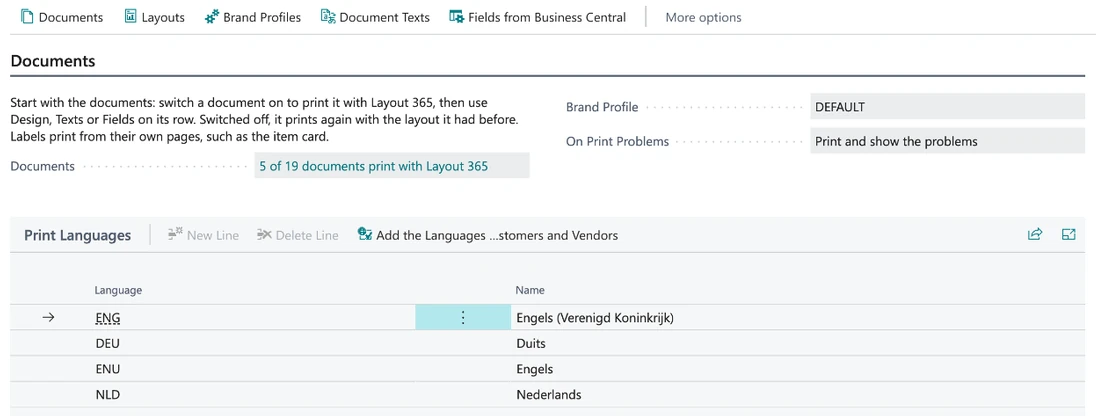
The Layout 365 Setup page with 5 of 19 documents print with Layout 365, Brand Profile DEFAULT, On Print Problems set to Print and show the problems, and the Print Languages ENG, DEU, ENU and NLD
Layout 365 Setup: the brand profile that prints, print problems and the languages you print in

Designed layouts, ready to switch on

More than 180 of Business Central's reports have a Layout 365 layout: the sales and purchase documents, statements and reminders, lists, registers, trial balances, VAT, inventory, warehouse and project reports. Each is checked against what Microsoft's own layout prints, so nothing goes missing.

Design without a developer

Click a field to put it on the page, drag it where you want it, change a text in every language you print in. Your logo, colors, letterhead and terms come from one brand profile. A report of another app starts from its own data.

Ask for a change

Describe what you want, such as "put the due date under the invoice number", and the AI button proposes the change for you to keep or discard. It uses Business Central's own Copilot.

Every field you need

A field the report does not have, such as the customer's phone number, is added from Business Central in a few clicks, without customizing a report.

Texts in every language

Dutch, French and English: see per language what prints and what is still missing, and change a text for one document or for all of them.

Printed by Business Central

Previews, prints and e-mails are made inside Business Central by the Layout 365 engine. No document leaves your environment to be printed.

Labels and codes

Item, customer, bin and employee labels on single labels or sheets, with barcodes and payment QR codes.

Safe to switch

Switch a report over when its layout is ready; switch it back and it prints as it did before.

Versions and packages

Every save and publish keeps a version that you can compare and restore. A package moves a layout with its pictures, texts and fields to another environment, for example from a sandbox to production.

Layout 365 Agent

A second app that works on requests in plain language: it changes the draft of a layout, fills in or translates document texts, and proposes fixes for what does not print as meant. A person checks every change in the designer and publishes it; the agent never publishes.

How it works

  1. Install and set up

    Install the app and open Layout 365 Setup: set the colors of your brand profile and check the languages you print in. In a production environment a trial of 30 days starts.

  2. Switch a document on

    On Documents, turn on Print with Layout 365 for a document. Its report then prints with the layout that comes with Layout 365, ready in one click.

  3. Make it yours

    Choose Design to open the document in the designer with the data of a real document. Change what you want, or describe it to the AI button, and check it with Preview.

  4. Publish

    Publish makes your layout the one the document prints with. Every version is kept, and switching the document off gives its report back the layout it had before.

What you need

Layout 365 runs in Business Central online and is set up on Layout 365 Setup.

Business Central
Online, version 28 or later
Editions
Essentials and Premium
Licence
One per production environment, arranged inside Business Central after a trial of 30 days. A sandbox prints without one
AI button
Business Central online, once an administrator switches on Layout 365 layout changes. Each request uses Copilot Credits, billed by Microsoft
Countries
The Netherlands and Belgium
Languages
English, Dutch and French

One plan, priced by full users

Every plan has every Layout 365 layout and the designer, in one production environment. The plans differ only in the number of full users.

  • Up to 10 full users

    €47.50 per month

  • 11 to 25 full users

    €97.50 per month

  • 26 to 50 full users

    €147.50 per month

  • 51 or more full users

    €185.00 per month

Per production environment per month, excluding VAT. Sandboxes are free. You register and subscribe inside Business Central, after a trial of 30 days. Full users are the enabled users with a Business Central Essentials, Premium or Device licence; team members, external accountants, administrators and disabled users do not count. How the licence works

Your documents stay in Business Central

Layout 365 prints with the data of your own environment, and it is built so that nothing else needs to see it.

Printed inside Business Central

The Layout 365 engine makes every preview, print and e-mail inside your environment. There is no outside service in the print path.

The AI button sends no values

Describe a change sends your request, the layout and the names of what the report offers. It never sends a value of a document: no customer, amount, address or line.

The permissions of whoever prints

A field from Business Central is read with the permissions of the person who prints: someone who may not see a table does not see its fields on a document either.

A person publishes

The AI button and Layout 365 Agent change drafts only. Nothing prints until a person has checked it and published it.

Questions

What happens if I switch a document back?

Its report prints with the layout it had before. Layout 365 never changes your Report Selections, and your Layout 365 layout stays, so you can switch it on again.

What stops when the licence has lapsed?

Only documents and e-mail bodies with a Layout 365 layout: they are no longer printed or sent, and a preview shows the mark "Layout 365: no licence". Choose a standard layout for the report to print it meanwhile. Your layouts are kept and everything else in Business Central keeps working.

Does it work with the reports of other apps?

Yes. A layout can belong to any report with a dataset: the designer starts it from the report's own data, and you design it further like any other.

How many documents can I print at once?

Business Central prints at most 200 documents in one run with a Layout 365 layout. Print larger runs in parts of 200 or fewer.

Does Layout 365 work on premises?

No. Layout 365 is an app for Business Central online, version 28 or later.

Documentation

The manual has a page for every screen of Layout 365, in Dutch and English, and the Learn more link of each screen in Business Central opens it.

  • Manual

    Help per screen, from Documents and the designer to texts, fields, labels, print problems and the licence.

  • Support

    How to ask for help, and what to send along.

Terms, privacy and manual

These three are about the apps and not about this website, so they are kept separate. The privacy statement and terms for van-oosten.nl itself are at the bottom of every page.

A question about Layout 365

Not sure whether Layout 365 fits your documents or your Business Central? Ask your question.