
Skip to content
Van Oosten Advies B.V.

Reference · Our own Business Central app

Type a post code and house number, the address comes from the BAG

Typing a Dutch address by hand takes time and now and then goes wrong. AdresDirect 365 is the Business Central app that takes this over: whoever types a post code and a house number on a customer, vendor or contact gets the street, city and province from the BAG, the Dutch address register of the Kadaster. Free, with the customer's own API key, and straight from Business Central to the Kadaster.

At a glance

Client
Our own product, published under the name Van Oosten Software
What
AdresDirect 365, an app for Microsoft Dynamics 365 Business Central
My role
Design, build, tests, documentation and the road to AppSource
Period
Version 2.0, September 2026
Status
Free, on its way to AppSource
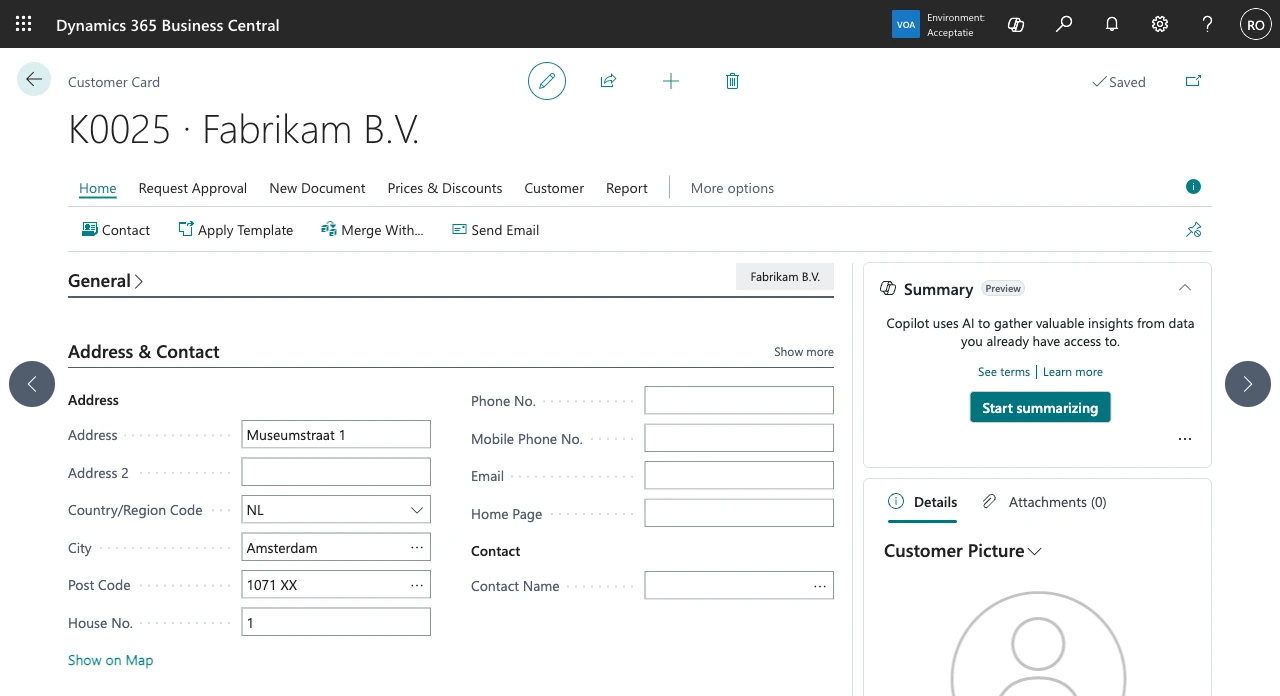
The customer card of Fabrikam B.V. in Business Central, where post code 1071XX and house number 1 filled in the address Museumstraat 1, the city Amsterdam and the post code rewritten as 1071 XX

The route of one address

  1. On the address card

    Someone types a post code and a house number on a customer, for example 1071XX and 1, and leaves the field.

  2. At the Kadaster

    Business Central looks the address up in the BAG directly, with the customer's own API key, and waits five seconds at most.

  3. In the fields

    Address, City and County fill in and the post code becomes 1071 XX. If several addresses fit, the user picks one.

  4. In the Post Codes table

    The post code found goes into the standard Post Codes table, so a known post code costs no request after that.

The starting point

Van Oosten Software built the app for its own work in Business Central and for that of its customers. Typing a Dutch address by hand is slow, and errors creep in: a street name with a typo, a city that does not belong to the post code.

Business Central's own post code table only goes part of the way: for a post code it gives a city, never a street. The street still comes from the memory of whoever is typing. So AdresDirect 365 looks the whole Dutch address up in the BAG of the Kadaster.

What was built in Business Central

AdresDirect 365 works in the standard screens of Business Central; it adds one field, House No. These are the screens of the user and of the administrator, taken in a Business Central sandbox with the English client and a real API key.

For whoever enters addresses

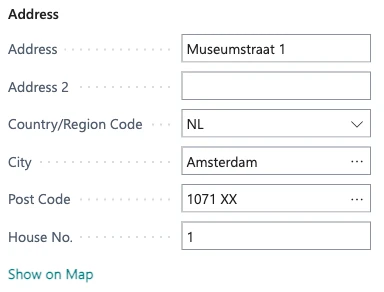
The address fields of the customer card: Address Museumstraat 1, Country/Region Code NL, City Amsterdam, Post Code 1071 XX and House No. 1

Two fields, a whole address

On the customer card the user types post code 1071XX and house number 1. As soon as they leave the field, the app fills in Address, City and County from the BAG and writes the post code as 1071 XX. With a post code alone, City and County come in.

  1. Street and house number from the BAG: Museumstraat 1, with Amsterdam as the city.

  2. Typed as 1071XX, written as 1071 XX.

  3. The House No. field, which the app adds right after Post Code.
On seven address cards

The House No. field and the lookup are not only on the customer card. They work the same way in seven places where Business Central records an address.

  • Customers
  • Vendors
  • Contacts
  • Ship-to addresses
  • Order addresses
  • Locations
  • Company information

Several addresses, the user picks

The app matches house letters and additions however they are typed: 12a, 12 - 2 or 12B bis. When no address fits exactly, the user decides. At post code 7311 KP, house number 17 exists only as Hofstraat 17A and 17B, and both are in the Pick an Address list.

The Pick an Address list with two addresses in post code 7311 KP in Apeldoorn: Hofstraat 17A, selected, and Hofstraat 17B
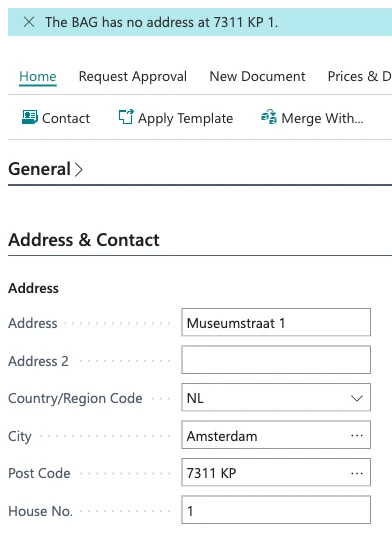
The customer card with the notification The BAG has no address at 7311 KP 1, while Address Museumstraat 1 and City Amsterdam stay next to Post Code 7311 KP

Nothing found, nothing lost

A wrong key, an address the BAG does not know, or five seconds without an answer: the fields stay as they were, and a notification says why. Saving is never blocked. Here the user typed post code 7311 KP with house number 1, an address the BAG does not know.

  1. The notification says why: the BAG has no address at 7311 KP 1.

  2. Address and city stay as they were.

  3. The typed post code stays too; the user can correct it or simply save.

For the administrator

One page, one key

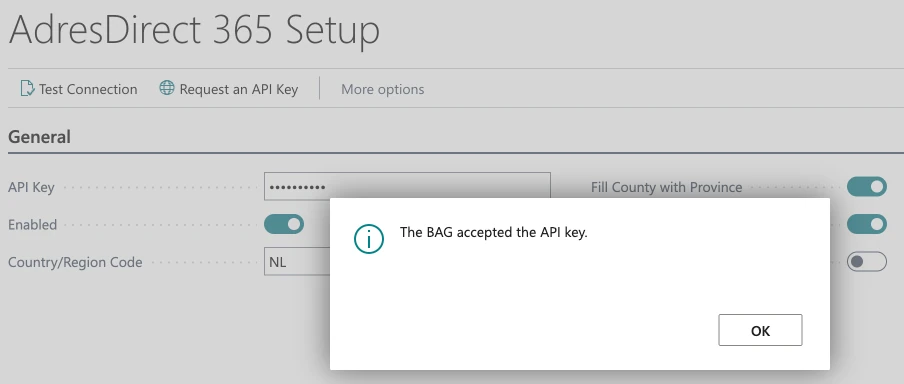
The app is listed in Business Central's Manual Setup. On AdresDirect 365 Setup the administrator pastes their own API key from the Kadaster, chooses Test Connection and switches the app on. Request an API Key opens the Kadaster's request form.

The Manual Setup list, searched for AdresDirect, with the line AdresDirect 365 and the description Enter your BAG API key
The AdresDirect 365 Setup page with the actions Test Connection and Request an API Key, a masked API key and the message The BAG accepted the API key
  1. Test Connection sends one request with the stored key to the BAG.

  2. The key is stored encrypted per company and is not shown again once saved.

  3. The BAG's answer: the key was accepted.

How I approached it

  1. The address from its source

    A post code table gives a city, not a street. So AdresDirect 365 looks the whole address up where it is kept: in the BAG of the Kadaster. That means the app works for Dutch addresses only, but it fills in the whole address, down to the province.

  2. The province without a request

    The BAG itself has no provinces. A table of 4,086 four-digit areas, built from GeoNames (CC BY 4.0), gives the province for the post code.

  3. Within the Kadaster's rules

    The Kadaster's key is meant for single lookups: at most 50,000 a day and 50 a second, no bulk. So by default the app only looks up while someone types. Whoever wants imports or integrations looked up too switches on Look Up for Imports and APIs.

  4. Tested without and with the BAG

    28 automated tests run against a mocked BAG. The build runs through Microsoft's code analyzers and lets not a single warning through. After that the app was tested live against the BAG, in a Business Central sandbox with a real key; the screens on this page come from there.

What the app promises, and what it does not

A lookup is a help, not a condition. These are the rules laid down in the code.

Saving always goes through

A wrong key, an unknown address or no answer within five seconds: the fields stay as they were, and a notification says why. The app holds nobody up.

Straight to the Kadaster

The request goes from the customer's Business Central directly to the Kadaster. There is no server of Van Oosten Software in between.

A key in the customer's name

Each customer requests a free API key from the Kadaster, with its request form. On working days it usually arrives within an hour.

Encrypted per company

The key is stored encrypted per company. Once saved, the setup page no longer shows it.

Only while someone types

By default the app only looks up while someone types. For imports and integrations it does so only when the administrator switches on Look Up for Imports and APIs, because the key is not meant for bulk.

A known post code costs nothing

Every post code found goes into Business Central's Post Codes table. A post code that is already there costs no request.

The result

AdresDirect 365 version 2.0 is free and on its way to AppSource: Microsoft has assigned the object range, the builds are signed and the submission is in progress. The manual, the release notes, the licence terms and the privacy statement are on this site.

For whoever records addresses in Business Central, the work hardly changes: the same cards, one more field. Only the address now comes from the BAG, and not from the memory of whoever is typing.

In figures

address cards with the House No. field, from customer to company information
7
four-digit areas the province is taken from
4,086
provinces, derived from the first four digits of the post code
12
automated tests, against a mocked BAG
28
warnings from Microsoft's code analyzers in the build
0
seconds is the longest the app waits for the BAG
5

Technology

Standard Business Central and one source outside it: the BAG of the Kadaster, called directly. No server in between.

  • AL for Business Central
  • BAG API Individuele Bevragingen
  • GeoNames (CC BY 4.0)
  • AppSourceCop, CodeCop and UICop
  • AL-Go for GitHub
  • Signed builds

Do you retype things in Business Central that are already right somewhere else?

Tell me which data you now enter by hand. I will tell you honestly whether an integration or an extension of your own is worth it, or whether something that will do already exists.