Skip to content
Van Oosten Advies B.V.

Free app for Business Central

Post code and house number, the rest fills itself in

Type a Dutch post code and a house number on a customer, vendor or contact, and AdresDirect 365 fills in street, city and province from the BAG, the official address register of the Dutch Kadaster. Free, with your own API key.

You type

Post Code
4431ch
House No.
40

The app fills in

Post Code
4431 CH
Address
Wilgestraat 40
City
's-Gravenpolder
County
Zeeland
An example with the address of Van Oosten Software. The post code is rewritten as 1234 AB.
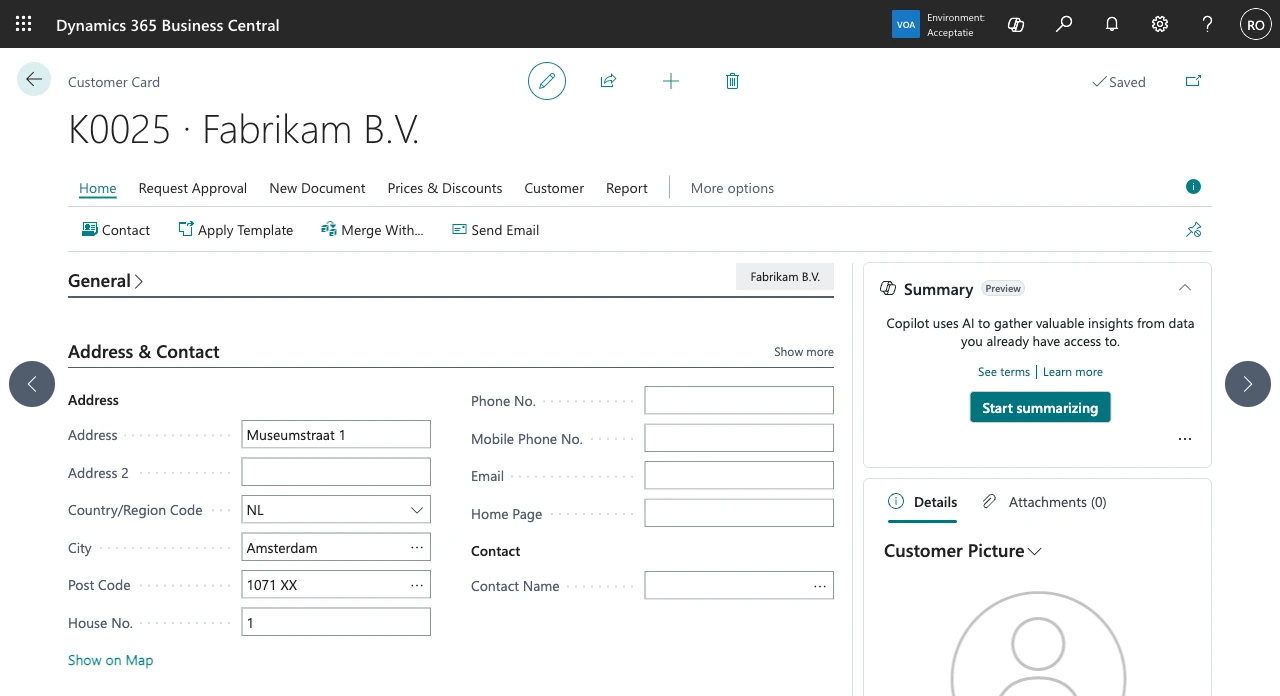
The customer card of Fabrikam B.V. in Business Central, where post code 1071XX and house number 1 filled in the address Museumstraat 1, the city Amsterdam and the post code rewritten as 1071 XX

Retyping an address is where the mistakes happen: a misspelled street, a city that does not belong to the post code, a province left empty. Business Central fills in only the city for a post code, and only when that post code is already in the Post Codes table. AdresDirect 365 fetches the address from the source: the Basisregistratie Adressen en Gebouwen (BAG) of the Kadaster, the Dutch register that holds every address in the Netherlands. It adds one field, House No., right after Post Code; everything else in Business Central works as you are used to.

What is in the app

One new field, one setup page, and otherwise the standard fields of Business Central. The screens below come from a Business Central sandbox with the English client and a real API key.

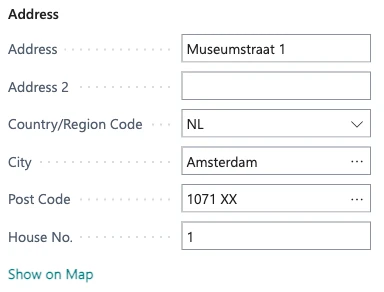
The address fields of the customer card: Address Museumstraat 1, Country/Region Code NL, City Amsterdam, Post Code 1071 XX and House No. 1
Post code 1071XX and house number 1 typed: Address and City come from the BAG, and the post code reads 1071 XX. The House No. field sits right after Post Code.
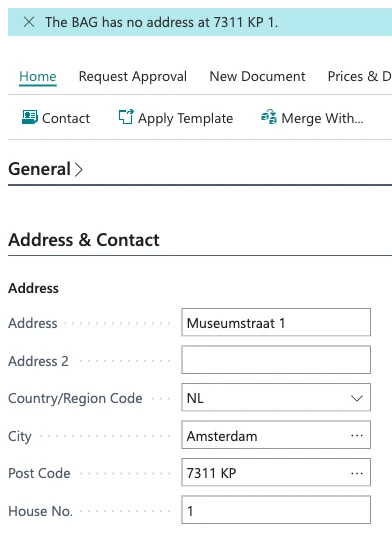
The customer card with the notification The BAG has no address at 7311 KP 1, while Address Museumstraat 1 and City Amsterdam stay next to Post Code 7311 KP
The BAG has no address at 7311 KP 1: a notification says why, and Address and City stay as they were. Saving works as usual.
The Pick an Address list with two addresses in post code 7311 KP in Apeldoorn: Hofstraat 17A, selected, and Hofstraat 17B
House number 17 in post code 7311 KP exists only as 17A and 17B. The user picks the right address in the Pick an Address list.
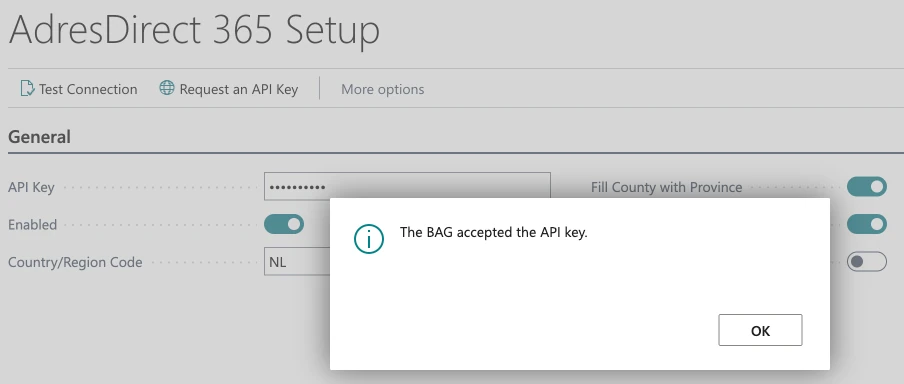
The AdresDirect 365 Setup page with the actions Test Connection and Request an API Key, a masked API key and the message The BAG accepted the API key
AdresDirect 365 Setup after Test Connection: the BAG accepted the API key. The key itself is not shown again.

The whole address from post code and house number

Type a post code and a house number, and the app fills in Address (street and house number), City and County with the province, and writes the post code as 1234 AB. With only a post code you get City and County, but not the street: one post code can span two streets.

On seven address cards

The House No. field sits right after Post Code on customers, vendors, contacts, ship-to addresses, vendor order addresses, locations and the company information.

House numbers the way people type them

12, 12a, 12 A, 12-2 or 12B bis: whatever follows the number is compared with house letter and addition together, as the BAG knows them. If nothing matches exactly, for example 14 where only 14A and 14B exist, the user picks from a list.

Province

The BAG has no provinces. The app derives the province from the first four digits of the post code, using a table of 4,086 areas built from GeoNames data.

Post codes as a memory

Every post code found goes into the standard Post Codes table of Business Central. When someone types a known post code after that, the city comes from there, without a request to the BAG.

Saving is never blocked

A wrong key, an unknown address or a BAG that cannot be reached: the fields stay as they were, and a notification says why. The user can always carry on.

Your own API key

The app uses the BAG API Individuele Bevragingen with an API key in your own name, which the Kadaster issues free of charge. The request goes straight from your Business Central to the Kadaster.

Only while someone types, unless you want more

By default the app looks up an address only while a user types on a card. With Look Up for Imports and APIs it also looks up addresses from an import, a configuration package or an API integration. Leave that off for large imports: the BAG API is not meant for bulk.

Set up on one page

On AdresDirect 365 Setup you paste the key, test the connection and switch the app on. The key is stored encrypted per company and never shown again.

How it works

  1. Request an API key

    Request a free API key for the BAG API Individuele Bevragingen from the Kadaster, in the name of your own organisation. The Request an API Key action on the setup page opens the request form.

  2. Install and set up

    Install the app, open AdresDirect 365 Setup, paste the key and choose Test Connection. Then switch on Enabled.

  3. Type post code and house number

    Type the post code and the house number on an address card. As soon as you leave the field, Address, City and County are filled in.

  4. Pick when it does not match exactly

    When a house number has several addresses and none matches exactly, you pick the right one in the Pick an Address list.

What to keep in mind

AdresDirect 365 looks up Dutch addresses only. The country on the address must be the one on the setup page (NL by default), or empty in a company that is itself in that country, and the post code must look like 1234 AB. Other addresses you type as always. Without an API key of your own from the Kadaster the app does nothing. That key is free, belongs to your organisation and may not be shared with other organisations, so Van Oosten Software does not provide one. It is meant for looking up addresses one at a time, with at most 50,000 requests a day, and not for bulk. In a sandbox an administrator also first has to let the app make outbound HTTP requests, on the Extension Management page.

What you need

The app is free. What else you need is listed below; the manual explains every step.

Business Central
Online, Essentials or Premium, version 28 or later
API key
A free API key of your own for the BAG API Individuele Bevragingen, requested by your organisation from the Kadaster
Outbound HTTP
In a sandbox only: turn on Allow HttpClient Requests in Extension Management, for AdresDirect 365, under Configure
Permissions
None for users who enter addresses; the AdresDirect 365 permission set for whoever maintains the setup
Country
The Netherlands. Addresses in other countries are not looked up
Languages
Dutch and English
Cost
None. The app is free, and so is the API key from the Kadaster

Privacy and security

Addresses of sole traders and private persons can be personal data. They stay in your own Business Central environment and do not pass through Van Oosten Software.

Straight to the Kadaster

The request goes from your Business Central environment directly to the BAG API, with your own key. Each request carries only the post code and, when there is one, the house number.

A key that does not come back

The API key is stored encrypted per company in isolated storage. Once saved, the page shows only ********.

Telemetry without addresses

Van Oosten Software receives only whether a lookup succeeded, found nothing or failed, with a fixed reason. Never post codes, house numbers, addresses, names or the key.

As few permissions as possible

Users who enter addresses need no extra permission set. The AdresDirect 365 set is only for whoever maintains the setup.

Where the data comes from

Two open sources. Addresses come fresh from the BAG on every lookup; the province table ships inside the app.

BAG, Kadaster

The Basisregistratie Adressen en Gebouwen of the Kadaster, through the BAG API Individuele Bevragingen. The BAG is open data (CC0).

GeoNames

The province per post code area is derived from GeoNames data (geonames.org), under the Creative Commons Attribution 4.0 licence (CC BY 4.0).

Frequently asked questions

What does it cost?

Nothing. The app is free, and the Kadaster issues the API key for the BAG API Individuele Bevragingen free of charge. There is no licence key and no trial period.

Can Van Oosten Software provide an API key?

No. The Kadaster issues a key to one organisation, and only that organisation may use it; sharing it with other organisations is not allowed. So you request a key yourself, free of charge, with the form the Request an API Key action opens. It arrives by e-mail, usually within an hour on working days during office hours, and you paste it into AdresDirect 365 Setup.

Can I use it to complete a whole list of addresses?

That is not what the BAG API is for. The Kadaster allows it for looking up one or a few addresses, with at most 50,000 requests a day and 50 a second, and not for bulk. That is why the app looks up only while someone types by default, and why Look Up for Imports and APIs is off by default. For large numbers the Kadaster offers BAG Extract and BAG GeoPackage.

Does it work for addresses in Belgium or Germany?

No. The BAG holds Dutch addresses only, and the app looks up an address only when its country is the Netherlands (or empty, in a Dutch company) and the post code looks like 1234 AB. Other addresses you type as always.

What happens when the BAG cannot be reached?

The fields stay as they were and a notification says why. Saving is never blocked. The app waits at most five seconds for an answer.

Do the addresses pass through Van Oosten Software?

No. The request goes straight from your Business Central environment to the Kadaster, with your own key. Van Oosten Software receives only technical telemetry, without post codes, house numbers or addresses.

Why does a post code alone not fill in the street?

Because one post code can span two streets. A post code alone gives City and County; the street comes once the house number is added.

Does the app overwrite what is already there?

Yes, when the address is found: Address, City and County then get the values from the BAG. When nothing is found, everything stays as it was.

Does it work in several companies?

Yes. Settings and API key apply per company, so you set up each company separately. In a company without settings nothing changes.

Documentation

The manual, the release notes and how to ask for help are on this site, in Dutch and English. They describe the version of the app that is current today.

  • Manual

    Setting up, daily use, what the notifications mean, the Post Codes table and the permissions.

  • Release notes

    What is in each version of the app, newest first.

  • Support

    How to ask for help, and what to send along.

Terms, privacy and manual

These three are about the app and not about this website, so they are kept separate. The privacy statement and terms for van-oosten.nl itself are at the bottom of every page.

A question about AdresDirect 365

Not sure whether the app fits the way you record addresses in Business Central? Ask, and you will usually have an answer within one working day.